Google’s Gemini app now runs directly on Apple CarPlay. iPhone owners can tap a Gemini icon on their car’s screen and hold a spoken, back-and-forth conversation with Gemini Live: asking what’s on the calendar, getting unread emails summarised, or talking through a presentation on the way to work. Google says the rollout is global and covers every language Gemini Live supports, which includes English in Australia.
Google announced it on Wednesday 11 November US time, early Thursday in Australia. It is a free app update rather than new hardware, but it puts a chatbot that can read your inbox on the dashboard. Here’s how to get it, what it does, what happens to those conversations, and why Australian road rules make it off-limits for some drivers.
What Gemini on CarPlay actually does
According to Google’s announcement, the CarPlay app is the same Gemini Live voice mode found in the iPhone app, redesigned for a car screen. You tap the icon on the CarPlay home screen or side rail, then either continue a recent conversation or start a new one. Google says you can interrupt, change the subject, or pause when you need to concentrate on an exit.
Google pitches four main uses: preparing for the day (“What does my day look like?”), working through your inbox via Gmail and Google Calendar, finding places to stop along the way, and brainstorming or rehearsing out loud. Chats sync to the Gemini app on your iPhone, so anything you talked through in the car shows up in your chat history after you park.
Some of this needs extra setup. The Daily Brief summary has to be switched on first, and Google says Daily Brief and some other personalisation features are not available to users under 18. The email and calendar features also depend on your Google account: work and school accounts, for example, only get Gemini if their plan includes it.
How to get it on your iPhone
Google lists three requirements before the icon will work. If it doesn’t appear straight away, be patient: Google describes the release as “rolling out”, and 9to5Mac reported the update was not yet live when the announcement went out.
- Update the Gemini app on your iPhone from the App Store.
- Give the Gemini app permission to use the microphone.
- Use Gemini Live on the phone at least once, then connect to CarPlay and tap the Gemini icon.
Australia is on Google’s list of supported countries for the Gemini iPhone app, which needs iOS 16 or later. Google says the CarPlay version is available to “all Gemini users on iOS”, not just paying subscribers. If you’re deciding whether a paid plan is worth it for the extra features, our comparison of AI subscription costs in Australia breaks down what Gemini, ChatGPT, Claude and Copilot charge.
Gemini is late to the party
Gemini was the last big chatbot without its own CarPlay app. MacRumors reports that Apple opened CarPlay to voice-based conversational apps in iOS 26.4, and that ChatGPT, Claude, Grok, Copilot and Perplexity already use it. Apple’s own Siri AI also has a CarPlay app in iOS 27. Gemini was previously available on CarPlay only inside Google Maps, as Engadget notes.
So the real choice for iPhone owners is which assistant they already trust with their data. Gemini’s advantage is that it can draw on Gmail and Google Calendar, so it suits people who already run their lives in Google’s apps. If you’ve been following how Gemini Live has developed, our earlier report on Gemini Live’s extended thinking mode explains how its voice mode works.
What happens to your conversations
Google’s Gemini Apps Privacy Hub says that, by default, your audio and Gemini Live recordings are not used to improve Google’s services unless you switch that setting on. Transcripts of Live chats are treated differently. They are covered by the Keep Activity setting, which keeps activity for 18 months by default (you can change this to three or 36 months or turn it off). Google says it uses that activity, with help from human reviewers, to improve its services, including training AI models.
That matters more in a car than on a phone. Anyone else in the car can hear Gemini read out an email summary, and a chat about a work email is saved like any other Gemini chat. Before you use it on a commute, it’s worth opening Gemini Apps Activity on your phone and checking those settings.
What Australian road rules say
Google says Gemini on CarPlay is designed to keep “your hands on the wheel and your eyes on the road”. In Australia, that pitch runs into road rules, which are set by each state and territory and were not written with AI chatbots in mind. We checked the official guidance for the two largest states.
Learner and provisional drivers: no. In NSW, learner, P1 and P2 drivers must not use a mobile phone at all while driving, even when stopped at lights. The ban covers phones in a holder and phones used hands-free, for example over Bluetooth. CarPlay runs from your phone, so in our reading it falls under that ban. Victoria’s rules for L and P platers are just as clear: they must not use voice controls to operate any device, including the car’s built-in system, and they can’t use a device for emails or websites while driving.
Fully licensed drivers: it’s a grey area. NSW lets fully licensed drivers use a phone hands-free only to make or receive voice calls and play audio. A phone in a fixed holder can also be used for maps and navigation. The NSW guidance says drivers must not use a phone “for any other function”, and lists emailing and using the internet among the banned uses. Victoria allows calls, audio, navigation and driver-assistance features through a mounted or built-in system. It allows entering information by voice control, but bans viewing emails, texts and websites while driving.
Neither state’s guidance mentions AI assistants, and having a chatbot read out an email summary doesn’t fit neatly into calls, audio or navigation. We could not find official guidance that settles it. Until regulators clarify, the cautious approach is to keep anything involving your inbox for when you’ve parked. Rules in other states and territories differ, so check your own road authority’s guidance.
Our read: the practical case for Gemini on CarPlay is strongest for things that are already plainly allowed and low on distraction, like asking where to stop for lunch or getting a calendar reminder before you leave the driveway. Working through email or role-playing a tough meeting is exactly the kind of thinking that pulls attention away from the road, whatever the legal answer turns out to be. Learner and P-plate drivers in NSW and Victoria should leave it switched off while driving.
Details in this article come from Google’s announcement, Google’s Gemini help pages, the NSW Government and Transport Victoria, and the independent reports linked above, as published on 11 and 12 November. This is general information, not legal advice. We’ll update it if road authorities issue guidance on AI assistants in cars.
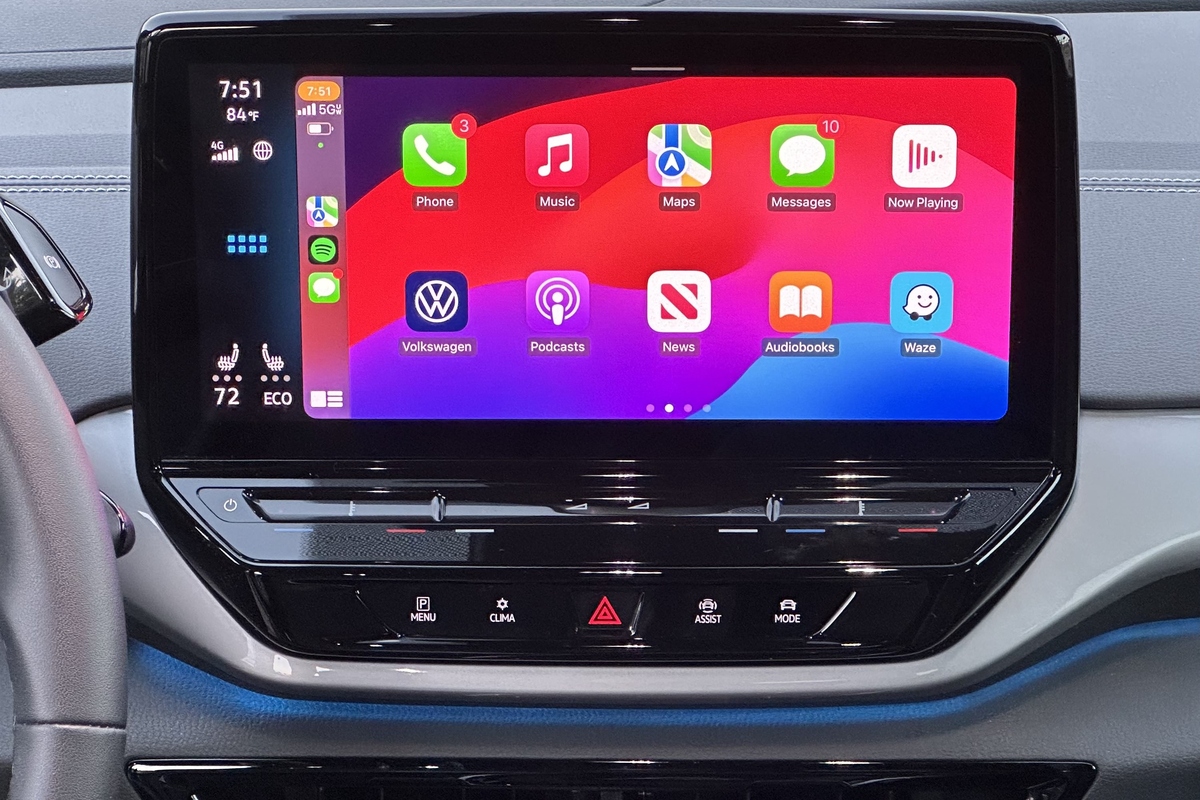
Featured image: Apple CarPlay running wirelessly on the dashboard screen of a 2023 Volkswagen ID.4, July 2023. The photo shows CarPlay’s home screen, not the Gemini app. Photo: Sunnyboy122 via Wikimedia Commons, dedicated to the public domain under CC0 1.0; cropped to 3:2, resized and converted to PNG. Apple, CarPlay, Volkswagen and other trademarks shown are for editorial purposes and do not imply endorsement.